Showing posts with label iPod. Show all posts

Jailbreak iOS 4.3.3 Untethered on iPhone 4, 3GS, iPad, iPod touch with PwnageTool 4.3.3

    The just released PwnageTool 4.3.3 by the iPhone Dev Team can jailbreak iOS 4.3.3 on iPhone 4, 3GS, iPad (1st-gen), iPod touch 4G/3G, Apple TV, and at the same time will help retain the old baseband for iPhone 4 and 3GS users so that they can unlock using Ultrasn0w.If your iPhone doesn’t rely on a carrier unlock, you can use Redsn0w for both Windows and Mac to easily jailbreak your device on iOS 4.3.3. Complete step by step instructions can be found here.Simply follow the instructions posted below to jailbreak iOS 4.3.3 on Mac using PwnageTool 4.3.3. If you are on Windows, or if you have Verizon iPhone 4 on iOS 4.2.8, simply follow our step by step instructions posted here to jailbreak using Sn0wbreeze 2.7.


    Step 2: Download iOS 4.3.3 firmware. Move all these files to the desktop.

    Step 3: Start PwnageTool in “Expert mode” and select your device:

    Step 4: Browse for iOS 4.3.3 firmware for your device as shown in the screenshot below:
    Jailbreak iOS 4.3.3 Untethered on iPhone 4

    Step 5: Now select “Build” to start creating custom 4.3.3 firmware file:
    NOTE: If you are with unofficial carrier, and want to preserve the old baseband so that it can be unlocked using Ultrasn0w, make sure you check “Activate the phone” option which is found under “General”.

    Step 6: PwnageTool will now create the custom .ipsw file for your iPhone which will be jailbroken.

    Step 7: Now follow the following steps to enter DFU mode using PwnageTool:
    Hold Power and Home buttons for 10 seconds
    Now release the Power button but continue holding the Home button for 10 more seconds
    You device should now be in DFU mode


    Step 8: Start iTunes, click on your iOS device icon from the sidebar in iTunes. Now press and hold left “alt” (option) button on Mac, or Left “Shift” button if you are on Windows on the keyboard and then click on “Restore” (Not “Update” or “Check for Update”) button in the iTunes and then release this button.
    This will make iTunes prompt you to select the location for your custom firmware 4.3.3 file. Select the required custom .ipsw file that you created above, and click on “Open”.
    Step 9: Now sit back and enjoy as iTunes does the rest for you. This will involve a series of automated steps. Be patient at this stage and don’t do anything silly. Just wait while iTunes installs the new firmware 4.3.3 on your iOS device. Your iOS device screen at this point will be showing a progress bar indicating installation progress. After the installation is done, your iOS device will be jailbroken on iOS 4.3.3.
    Source URL: https://k12-information.blogspot.com/search/label/iPod
    Visit Techno Information for Daily Updated Hairstyles Collection
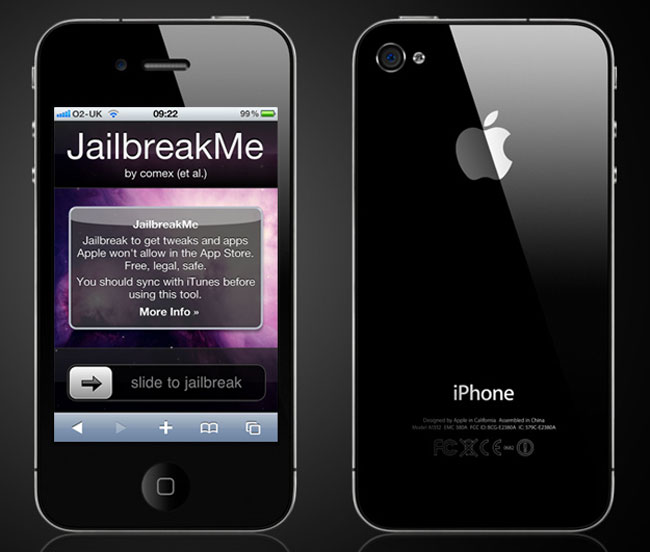
Download JailbreakMe 3.0 – Jailbreak iPhone / iPod / iPad

    JailbreakMe 3.0


    What is JailbreakMe Tool mean ?
    JailbreakMe is a jailbreak tool online, unlike the tool Redsn0w and Greenpois0n, it does not require the use of a computer and the jailbreak process is very fast execution.
    Your jailbreak your iDevice runs Online (Internet) with the Safari application on your iDevice.
    Untethered your jailbreak is, when you restart (reboot) your iDevice, it will require no assistance from a third party software to gain access back to the springboard.

    JailbreakMe 3.0 Preamble :

    Make sure you have an Internet connection on your iDevice (WiFi or 3G).
    It is advisable for the model to cut the iPhone 3G and jailbreak to do this via WiFi at the moment are still some bugs to fix in JailbreakMe.
    It is recommended to restore your iDevice, to erase all traces of the old jailbreak and allows to have a stable jailbreak.
    It is strongly recommended to restore your iDevice as a new device. Just sync your new applications, music, videos, images, notes and contacts (on Windows, make sure you have Outlook installed) via the iTunes software following the restoration.
    But you can do this on a jailbreak iDevice with lots of installed apps and data such as images, contacts, etc.. without loss of data following the jailbreak.
    In this case it is advisable to synchromiser your iDevice with iTunes prior to the jailbreak.
    IPhone user, you must have the SIM card that came with your iPhone official for its activation following the restoration of the IOS.

    JailbreakMe 3.0 How to Guide :

    • Go to “Settings” of your iDevice.
    • Disable the “Block pop-up” and then empty your cache.
    • Then in the “Settings” menu of your iDevice, go to “General” then “Auto Lock” and click “Never”.
    • Then start the application from your iDevice Safari.
    • Then type in the address bar of your browser: http://jailbreakme.com
      Click on “Free” and “install” to start the jailbreak online.
    • The Safari application is closed, return to your springboard.
    • The application installs Cydia on your 2 nd page of your springboard.
    • You can see a very quick jailbreak procedure compared to using software like
    • Redsn0w, does not need to go into DFU mode.
    • You must complete the installation of the application Cydia.
    • Launch application from Cydia on your springboard iDevice.
    • Choose one use “user” mode for novices and let the data load.
    • For protection of the fault operated tool JailbreakMe (feat using Safari on a PDF file), install the package “PDF Patcher 2? from Cydia.
    • It is advisable to manually reboot your iDevice (Home + We then turn off).
    Source URL: https://k12-information.blogspot.com/search/label/iPod
    Visit Techno Information for Daily Updated Hairstyles Collection

Blog Archive